
It just keeps popping up. How many times do I need to be asked if I want to install Safari? I was almost tempted to just so it it would stop popping up. Here is how you can disable Apple Software Update in Windows.
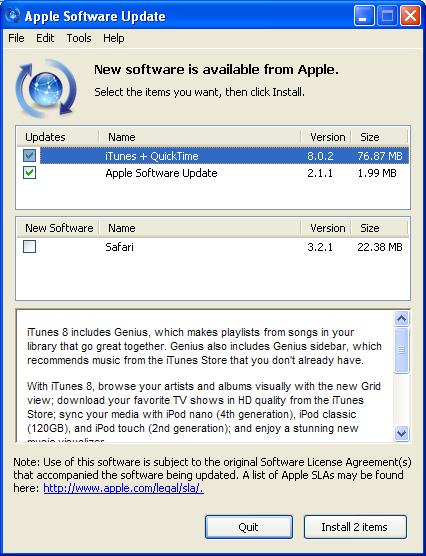
It is set to pop up weekly via Scheduled Tasks. So we will disable it from there…
1. From the Start Menu, click All Programs -> Accessories -> System Tools -> Scheduled Tasks
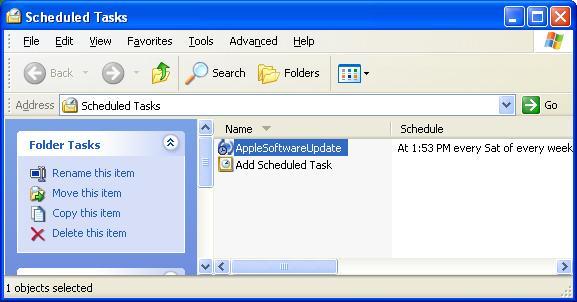
2. Double Click the AppleSoftwareUpdate item to bring up the properties window.
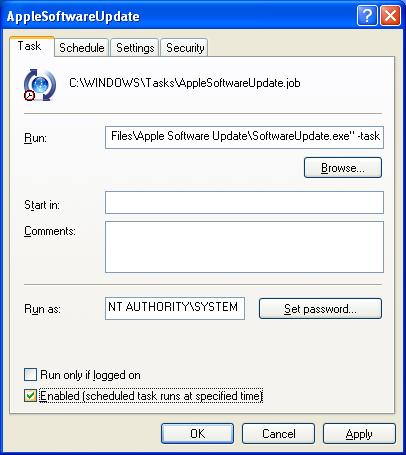
3. Un-check Enabled, and Click OK
That should fix that. You can always go back to Scheduled Tasks and run it manually by right clicking the AppleSoftwareUpdate and selecting Run.


January 24th, 2010 at 8:02 am
the schedule restored itself on attempt remove the software at add/remove
this happens even if schedule is deleted.
using xp service pack2. apple software came with itunes 9….latest
August 10th, 2011 at 2:43 pm
thank you! Apple sucks they are very rotten spyware dont use itunes
August 17th, 2011 at 12:03 pm
Thank you! We don’t even have Apple computers!
October 29th, 2011 at 11:49 am
There was a time when I admired Apple, innovative, well designed, forward thinking structural genius’s. When you absolutely need a dedicated hard working machine Apple is the way to go, however. Since they have had their snouts in the big bucks international music scam they are now no better than the rest.
The problem is not the music industry, it’s the Copyright laws that allow Corporations to purchase the rights to someone else’s artistic property.Fraudsters charging you and and your children for the same thing over and over again.
Alas any moaning here will do little unless we can teach our children not to fall for the scams they play.
Information of all types should remain free!
November 2nd, 2011 at 9:24 am
hi ALL,
i was able to uninstall apple software update from add/remove programs.
whenever i click remove it errors out saying issue with windows installer package.
at last i clicked on change it asked from repair or remove i clicked repair after that in add/remove programs clicked on remove to successfully uninstall apple software update
December 30th, 2011 at 12:02 am
Thank you! I have been reading forums all night long and nothing was working, including a restore point. I did the “change” and “repair” as you suggested, then I deleted it! Wowsa! Thank you again.
January 26th, 2012 at 3:40 pm
i cannot find the applesoftwareupdate.msi on my computer. i copied on from another computer but it may be the worng version. the repair locked up without the .msi file and still locks up with the copied one.
any ideas?
April 26th, 2012 at 10:35 pm
You are the man. It worked!!!
September 7th, 2012 at 8:15 am
thank you!! I didn’t think I’d EVER get this thing uninstalled!! this did the trick.
July 2nd, 2013 at 1:32 pm
Thanks a lot, this just solved the error trying to delete/remove Apple Software Update.
February 1st, 2012 at 8:56 pm
Thank you for the good writeup. It actually was once a entertainment account it. Glance advanced to more introduced agreeable from you! By the way, how could we be in contact?
March 18th, 2012 at 9:18 pm
dude, you can’t unenable it, it is greyed out. you just right click and hit delete task. then you can delete the apple folder. then you are good. rocket science.
August 9th, 2013 at 10:02 pm
1) Repair the apple update
2) Click change
3) Will prompt to repair or remove
4) Click remove
-it should uninstall the software